Your best recruiting topics
Which subjects make viewers want more of you. Usually not the videos with the most views, and that surprise is worth the whole setup.
You put your Skool link in every description and pinned comment. YouTube tells you who watched, Skool tells you who joined, and neither tells you which video did the work. SkoolTrafficTracker gives every video its own tracked link, so the answer is a leaderboard, not a guess.
Create a short link for your Skool page and tag it with the video it belongs to. Takes about ten seconds per video.
Drop the link where your viewers already look. Every click is recorded against that exact video, with country and unique-visitor counts.
SkoolTrafficTracker pulls your video view counts (read-only) and computes a watch-to-click rate for every video, ranked on a leaderboard.
Views measure attention. Clicks measure intent. The watch-to-click rate divides one by the other: out of everyone who watched a video, how many clicked through toward your Skool community? A video with 4,000 views and 12 clicks is entertaining. A video with 900 views and 41 clicks is a recruiting machine, and you should make five more like it.
This is the difference between YouTube link tracking and a generic link shortener. A shortener tells you "137 clicks". SkoolTrafficTracker tells you "137 clicks, 89 of them from the pricing-objections video, which converts viewers at three times your channel average".
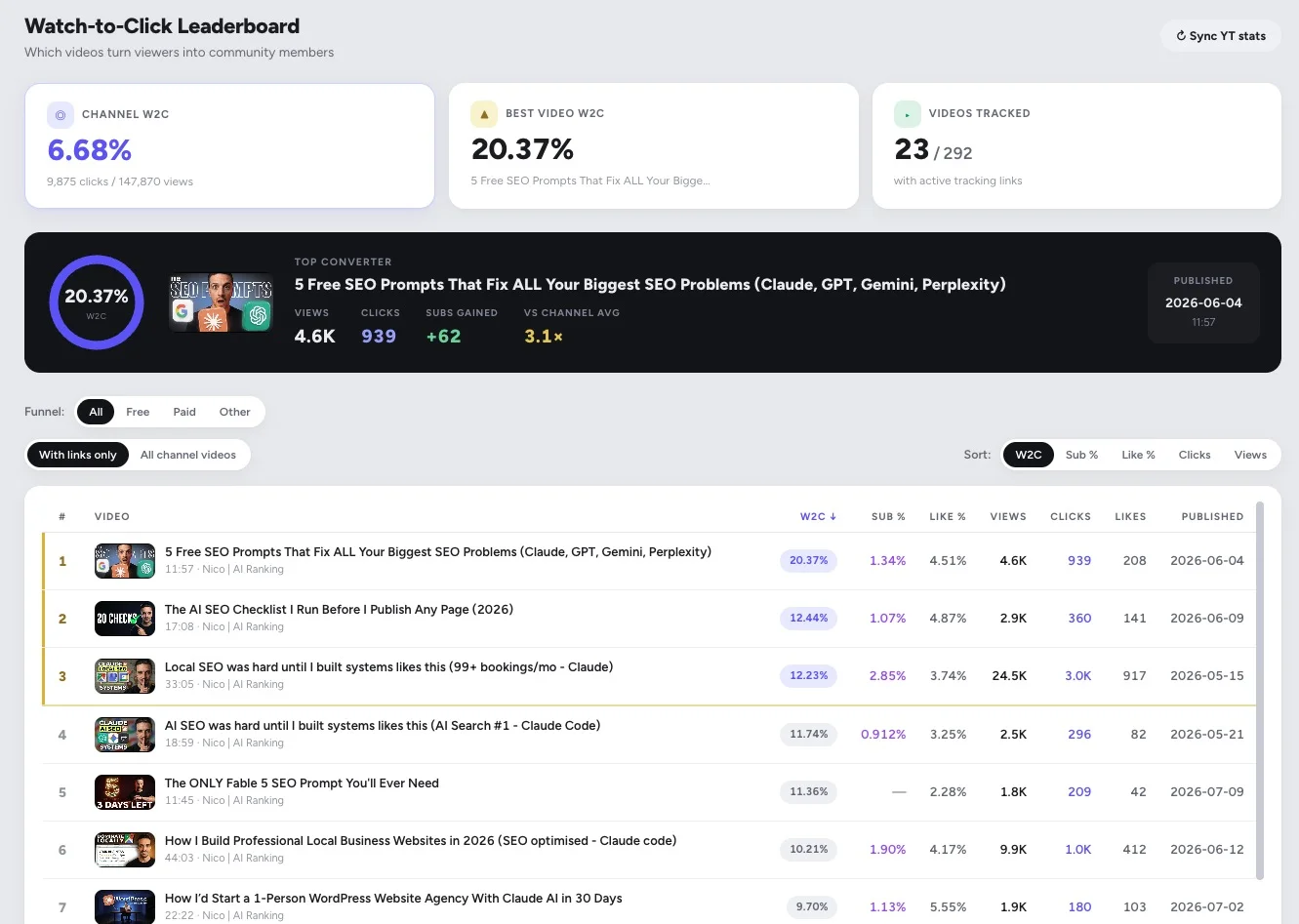
The leaderboard on a real channel: the top converter turns 20.37% of viewers into clicks, 3.1× the channel average.
Which subjects make viewers want more of you. Usually not the videos with the most views, and that surprise is worth the whole setup.
Separate links for each format show which one sends people who actually click, not just people who scroll past.
Use two links for the same video and see which placement your audience actually uses. Then stop maintaining the one they ignore.
Create one short link per video, drop it in that video's description and pinned comment, and every click is recorded against that video. Connect your YouTube channel and SkoolTrafficTracker also pulls view counts, so you see the watch-to-click rate for every video.
YouTube Studio shows you clicks leaving YouTube in aggregate, and Skool shows you who joined. Neither ties a specific video to the members it produced. A per-video tracked link closes that gap: the click count belongs to one video, not your whole channel.
Yes. Shorts can't hold a description link as prominently, but a pinned comment link works, and many Skool owners route Shorts viewers through their channel banner or a dedicated link. Each of those can be its own tracked link, so you can compare Shorts against long-form.
It varies by niche, but the point is comparison, not an absolute number. If one video converts 20 in every 1,000 viewers and another converts 2, you know which topic and style to make more of. The leaderboard ranks your videos so the winners are obvious.
Only for the watch-to-click leaderboard. Plain link tracking works without any connection. If you do connect, SkoolTrafficTracker uses read-only YouTube permissions: it can see your video stats, and it can never post, edit, or delete anything.
Create your first tracked link in under a minute. Free for your first 3 links.
Start free