TikTok → Skool

Track which TikTok videos send clicks to your Skool community

TikTok gives you one bio link and takes away your referrer data: its in-app browser makes your visitors look like they came from nowhere. A tracked short link fixes both, so you finally know what TikTok is really sending you.

How it works

TikTok link tracking in three steps

  1. 1

    Tracked link in bio

    Replace your raw Skool URL with a tracked short link. Every tap counts, whether or not TikTok's browser passes a referrer.

  2. 2

    Rotate on big pushes

    Posting a video that points at your bio? Swap in a link tagged for that video first. The spike that follows has a name on it.

  3. 3

    Compare against everything

    Your dashboard puts TikTok next to YouTube, Instagram, and email, so you see which platform actually grows your community.
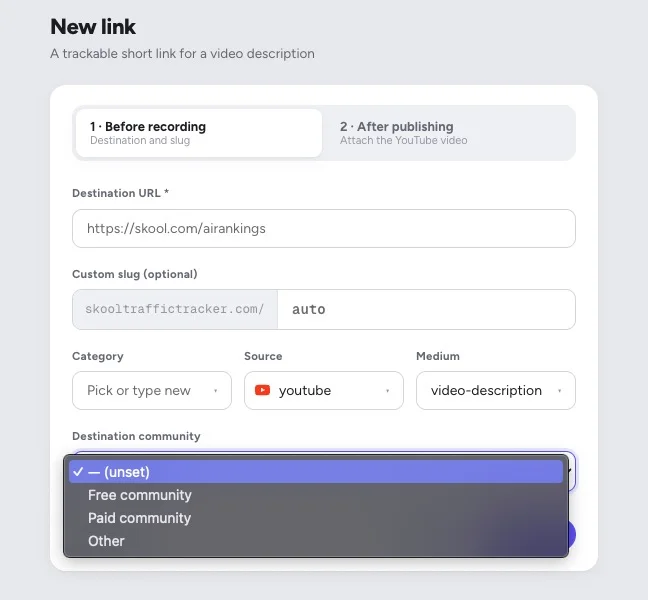
New link form in SkoolTrafficTracker: destination URL, custom slug, and category, source, and medium tags

Creating a tracked link takes ten seconds: paste your Skool URL, tag the source, done.

The TikTok problem

Big views, invisible clicks

TikTok is famous for reach and infamous for attribution. Views are huge, but the in-app browser strips referrers, so other analytics tools file your TikTok visitors under "direct". You end up crediting the wrong platform for your growth, or worse, doubling down on TikTok because the view counts feel good while your actual members come from YouTube.

A tracked link sidesteps the whole mess. Attribution lives in the link, not the referrer. If 214 people came through your TikTok bio link this week, that number is exact, and you can put it side by side with your YouTube and Instagram numbers to decide where next month's effort goes.

FAQ

TikTok tracking questions

How do I track TikTok clicks to my Skool community?

Put a tracked short link in your TikTok bio. Every tap is recorded with time, country, and unique visitors. When you push a specific video ('link in bio!'), swap in a link tagged for that video, and the clicks that follow belong to that push.

TikTok only allows one bio link. Can I still tell videos apart?

Yes, by rotating: before a big video goes up, switch your bio to a link tagged for it. The click spike that follows is attributable to that video. It's not perfect per-video attribution like YouTube descriptions allow, but it turns 'TikTok sent some clicks' into 'that video sent 214 clicks'.

Why do my TikTok viewers show up as 'direct' traffic everywhere else?

TikTok's in-app browser often strips referrer data, so analytics tools can't tell those visitors came from TikTok. A tracked short link doesn't rely on referrers: if the click came through your TikTok link, it counts as TikTok, every time.

Is TikTok even good for growing a Skool community?

That is exactly the question tracking answers for your account. Some Skool owners find TikTok sends huge but shallow traffic; others find one niche format quietly outconverts everything. Run tracked links for a month and you'll know whether TikTok deserves your time, with your own numbers.

Does this work for TikTok ads too?

Yes. A tracked link works as a landing URL anywhere, including paid placements. Tag it as paid so your dashboard separates organic bio clicks from ad clicks.

More platforms

Track every road into your Skool

See what TikTok really sends you

Create your first tracked link in under a minute. Free for your first 3 links.

Start free