How do you create a Skool community?
You sign up for Skool, create a group, choose free or paid access, and your community exists the same day. The free trial means you can build everything before paying.
Here is the setup order that works:
- Create the group and pick a name people would actually search for.
- Cover image, icon, and description. Your about page is your landing page, so treat the description like sales copy: the problem you solve, who it is for, what is inside.
- Set up 3 to 5 feed categories like Introductions, Wins, and Questions, so early posts have obvious homes.
- Write the Start Here post with a short welcome video explaining how the community works and what to do first.
- Load one course into the Classroom before inviting anyone, so the shelves are not empty on day one.
How much does it cost to start?
Skool starts at $9 a month after the free trial, with unlimited members, courses, and live calls included. The 10% transaction fee on that plan only matters once members pay you.
Our Skool pricing guide covers when the $99 Pro plan becomes the cheaper option (short version: at about $1,270 a month in member revenue).
How should you set up your welcome experience?
Give every new member a quick win within minutes of joining, and an intro that explains how your community works. Those are the two things I skipped at launch, and adding them later changed how new members stick.
A quick win is something a member can use immediately: a template, a prompt pack, a checklist, a mini-lesson that gets a result in ten minutes. It sets the perceived value of everything else in the community. Without it, people join, scroll once, and never come back.
How do you get your first members?
Publish a tutorial on YouTube or TikTok that uses a resource, and put that resource inside your community. That is how I got my first 10 members, and it still works today: the viewer needs the prompt, the file, or the link, and joining is how they get it.
It beats "join my community" pitches because the viewer has a concrete, immediate reason to join, and they arrive already warmed up by your teaching. Pair it with your warm audience: past clients, email list, and anyone who already knows your work.
How do you know which platform actually brings members?
Skool's growth dashboard shows visitors and signups by source, and the two lists rarely match. In my last 30 days, Instagram sent 631 visitors to my about page and did not register a single signup in the sources list, while YouTube sent 1,163 visitors and 21 new members.
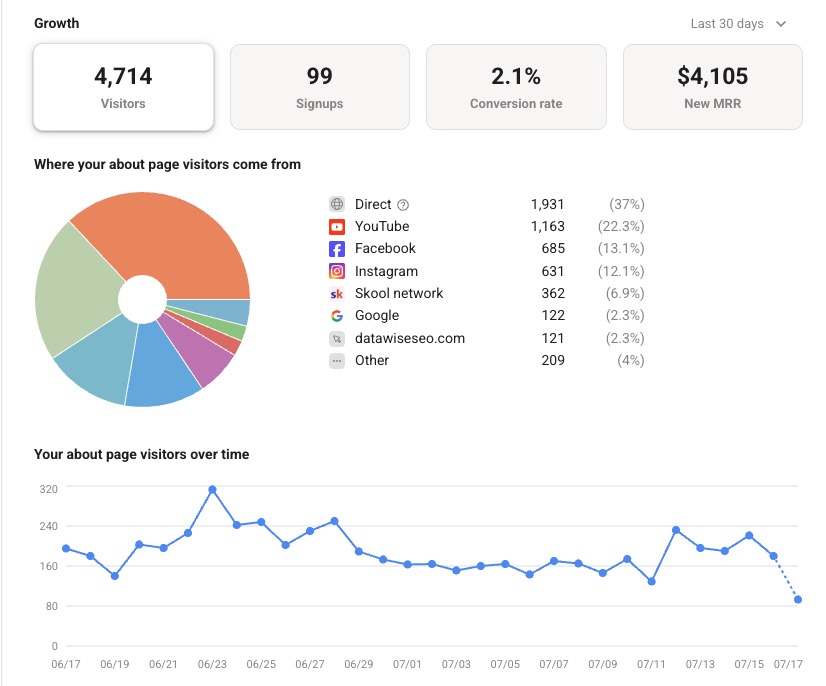
My about-page visitors by source, last 30 days. Traffic volume is not the same thing as members.
| Source | Visitors | Signups | Conversion |
|---|---|---|---|
| Skool network | 362 | 18 | 5.0% |
| 122 | 4 | 3.3% | |
| YouTube | 1,163 | 21 | 1.8% |
| Direct | 1,931 | 30 | 1.6% |
| 685 | 7 | 1.0% | |
| 631 | 0 | ~0% |
My real 30-day numbers: visitors from the about-page report, signups from the same dashboard's signup breakdown. Instagram sent my third-biggest social audience and converted none of it, which changed where I spend my content time.
And that is as deep as Skool's own analytics go, because its referral tracking uses 14-day last-touch attribution: it knows the platform, never the video. To learn which specific video or post fills your community, give each one its own tracked link with per-video link tracking. That is the tool I built for my own funnel, and it is free for your first 3 links.